The Edge AI Revolution: Deploying Local LLMs and High-Performance Inference with Python
The paradigm of Artificial Intelligence is undergoing a seismic shift. For the past decade, the dominant narrative focused on massive cloud clusters, infinite scalability of centralized GPUs, and API-driven interactions. However, a new frontier has emerged that prioritizes proximity, latency, and privacy: Edge AI. This transformation is not merely about moving computation closer to the user; it is a fundamental architectural evolution that enables real-time decision-making without the latency penalties of round-trip network requests.
Edge AI involves running machine learning models directly on end devices—ranging from IoT sensors and microcontrollers to smartphones, edge servers, and autonomous vehicles. This approach addresses critical bottlenecks in bandwidth and ensures data sovereignty, a growing concern in Python security and privacy compliance. As we witness the rise of Local LLM (Large Language Model) deployment, developers are tasked with squeezing state-of-the-art performance into resource-constrained environments.
In this comprehensive guide, we will explore the technical architecture of Edge AI, focusing on model optimization, the modern Python ecosystem, and practical implementation strategies. We will delve into how innovations like GIL removal in Python 3.13, the emergence of the Mojo language, and efficient runtimes are reshaping what is possible at the edge.
Section 1: Core Concepts and the Edge Ecosystem
To understand Edge AI, one must distinguish between training and inference. While training large models (like those powering PyTorch news headlines) requires massive compute, inference—the act of using the model to make predictions—can be highly optimized. The goal is to reduce the model size and computational complexity with minimal loss in accuracy.
The Hardware-Software Symbiosis
The hardware landscape for Edge AI is diverse. We have Microcontrollers (MCUs) running MicroPython updates or CircuitPython news-worthy libraries, Single Board Computers (SBCs) like the Raspberry Pi or NVIDIA Jetson, and mobile devices with dedicated Neural Processing Units (NPUs). The software stack must bridge the gap between high-level Python code and this specialized silicon.
Frameworks have evolved to support this. Keras updates have introduced more portable model formats, while TensorFlow Lite and ONNX Runtime have become the de facto standards for cross-platform inference. Furthermore, the introduction of PyScript web technologies allows for client-side execution of Python logic directly in the browser, effectively turning the user’s laptop into an edge node.
Below is an example of how one might set up a basic environment check to determine available hardware acceleration, a crucial first step in any Edge AI pipeline.
import torch
import platform
import psutil

def check_edge_capabilities():
    """
    Analyzes the edge device capabilities for AI inference.
    """
    system_info = {
        "System": platform.system(),
        "Processor": platform.processor(),
        "RAM_GB": round(psutil.virtual_memory().total / (1024.0 **3), 2)
    }

    # Check for accelerators common in Edge AI
    if torch.cuda.is_available():
        device = "cuda"
        details = torch.cuda.get_device_name(0)
    elif torch.backends.mps.is_available():
        device = "mps" # Apple Silicon
        details = "Metal Performance Shaders"
    else:
        device = "cpu"
        details = "Standard CPU Execution"

    print(f"--- Edge Device Diagnostics ---")
    print(f"OS: {system_info['System']}")
    print(f"Memory: {system_info['RAM_GB']} GB")
    print(f"Inference Device: {device.upper()} ({details})")

    return device

# Run diagnostics
edge_device = check_edge_capabilities()
Section 2: Implementation Details and Model Optimization

IT technician working on server rack – Technician working on server hardware maintenance and repair …
The primary challenge in Edge AI is fitting a square peg (large model) into a round hole (limited memory). This is where quantization and pruning come into play. Quantization involves reducing the precision of the model’s parameters from 32-bit floating-point (FP32) to 8-bit integers (INT8) or even 4-bit, significantly reducing memory footprint and increasing inference speed.
Quantization with PyTorch
Modern PyTorch news often highlights dynamic quantization, which is particularly effective for LSTM and Transformer models commonly used in NLP. By quantizing the weights, we can often achieve a 2x-4x reduction in model size. This is essential when deploying Local LLM solutions or Python automation scripts on devices with limited RAM.
Here is a practical example of taking a standard PyTorch model and applying dynamic quantization for edge deployment:
import torch
import torch.nn as nn
import os

class SimpleEdgeModel(nn.Module):
    def __init__(self):
        super(SimpleEdgeModel, self).__init__()
        self.fc1 = nn.Linear(512, 256)
        self.relu = nn.ReLU()
        self.fc2 = nn.Linear(256, 10)

    def forward(self, x):
        return self.fc2(self.relu(self.fc1(x)))

def optimize_for_edge(model_path='edge_model.pth'):
    # 1. Initialize and load model
    model = SimpleEdgeModel()
    # In a real scenario, you would load trained weights here
    # model.load_state_dict(torch.load(model_path))
    model.eval()

    # Get original size
    torch.save(model.state_dict(), "temp_fp32.pth")
    size_fp32 = os.path.getsize("temp_fp32.pth") / 1024

    print(f"Original Model Size (FP32): {size_fp32:.2f} KB")

    # 2. Apply Dynamic Quantization
    # We quantize the Linear layers to qint8
    quantized_model = torch.quantization.quantize_dynamic(
        model,
        {nn.Linear},  # Specify layers to quantize
        dtype=torch.qint8
    )

    # 3. Save and compare
    torch.save(quantized_model.state_dict(), "temp_int8.pth")
    size_int8 = os.path.getsize("temp_int8.pth") / 1024

    print(f"Quantized Model Size (INT8): {size_int8:.2f} KB")
    print(f"Reduction: {size_fp32 / size_int8:.2f}x")

    # Clean up
    os.remove("temp_fp32.pth")
    os.remove("temp_int8.pth")

    return quantized_model

# Execute optimization
q_model = optimize_for_edge()
Data Handling at the Edge
Efficient data processing is just as critical as model inference. Pandas updates continue to improve performance, but for edge devices, memory overhead is a killer. This has led to the rise of Polars dataframe, a Rust-based library that offers lightning-fast data manipulation with a fraction of the memory usage. Similarly, DuckDB python integration allows for SQL-on-files analysis directly on the device, perfect for aggregating sensor logs before inference.
Section 3: Advanced Techniques: Local LLMs and RAG
The cutting edge of Edge AI is running Generative AI locally. With LlamaIndex news and LangChain updates focusing heavily on local execution, developers can now build Retrieval-Augmented Generation (RAG) systems that run entirely offline. This is vital for industries like healthcare or Python finance, where data cannot leave the premise.
Using tools like `llama-cpp-python`, we can load GGUF (GPT-Generated Unified Format) models that are optimized for CPU inference. This allows a standard laptop or a high-end Raspberry Pi to run models like Llama 3 or Mistral. Furthermore, integrating vector stores locally allows for context-aware responses without hitting an API.
Below is an example of setting up a local inference chain using LangChain and a local model file. Note the use of Type hints to ensure code robustness, a practice enforced by MyPy updates.
from langchain_community.llms import LlamaCpp
from langchain.prompts import PromptTemplate
from langchain.chains import LLMChain
from langchain.callbacks.manager import CallbackManager
from langchain.callbacks.streaming_stdout import StreamingStdOutCallbackHandler

def setup_local_llm(model_path: str) -> LLMChain:
    """
    Configures a Local LLM chain optimized for edge inference.
    """
    # Callbacks support streaming tokens to reduce perceived latency
    callback_manager = CallbackManager([StreamingStdOutCallbackHandler()])

    # Initialize LlamaCpp (highly optimized for CPU/Edge)
    llm = LlamaCpp(
        model_path=model_path,
        temperature=0.1,
        max_tokens=256,
        n_ctx=2048,
        top_p=1,
        callback_manager=callback_manager,
        verbose=True,  # Verbose is required to pass to the callback manager
        n_threads=4    # Adjust based on edge device cores
    )

    template = """
    Question: {question}

    Answer concisely suitable for a mobile notification:
    """

    prompt = PromptTemplate(template=template, input_variables=["question"])

    llm_chain = LLMChain(prompt=prompt, llm=llm)
    return llm_chain

# Usage Example (Conceptual - requires a .gguf model file)
# chain = setup_local_llm("./llama-3-8b-quantized.gguf")
# response = chain.invoke("What is the temperature trend?")
Modern Tooling and Dependency Management

Managing environments on edge devices can be painful. The traditional `pip` workflow is being challenged by faster, more robust tools. The Uv installer and Rye manager are gaining traction for their speed in resolving dependencies, which is crucial when provisioning fleets of edge devices. Additionally, build backends like Hatch build and PDM manager provide better isolation, ensuring that system libraries don’t conflict with application dependencies.
Section 4: Best Practices, Security, and Optimization
Deploying to the edge requires a shift in mindset regarding code quality and security. Unlike cloud servers protected by firewalls, edge devices are often physically accessible. Python security practices, such as obfuscation and Malware analysis defense mechanisms, become relevant. Moreover, automated testing using Pytest plugins ensures that updates don’t brick remote devices.
Performance Tuning
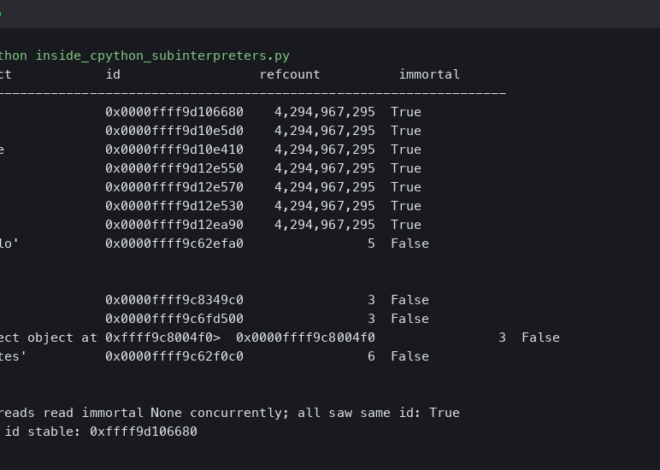
Python’s Global Interpreter Lock (GIL) has long been a bottleneck for multi-threaded performance. However, with the upcoming GIL removal (Free threading) in Python 3.13, edge devices with multi-core CPUs will see significant performance gains in concurrent workloads. Until then, using asynchronous frameworks like FastAPI news-featured tools or Litestar framework allows for efficient handling of I/O bound tasks, such as reading sensor data while processing inference requests.
For UI-based edge applications (e.g., a kiosk or control panel), Reflex app, Flet ui, and Taipy news offer ways to build reactive interfaces purely in Python, avoiding the overhead of a full JavaScript frontend stack.
Code Quality as a Performance Metric
Inefficient code drains batteries. Using the Ruff linter (which is incredibly fast) and Black formatter ensures code is not only readable but free of common performance anti-patterns. SonarLint python integration can further help detect cognitive complexity that might slow down execution.
Here is a snippet demonstrating an asynchronous inference server pattern, ideal for edge nodes acting as local API gateways:
from fastapi import FastAPI, HTTPException
from pydantic import BaseModel
import asyncio
import time

# Initialize FastAPI (Lightweight and fast)
app = FastAPI(title="Edge Inference Node")

class InferenceRequest(BaseModel):
    sensor_id: str
    data_points: list[float]

async def mock_heavy_inference(data):
    """
    Simulates a blocking inference call.
    In Python 3.13+ with free-threading, this scales better.
    """
    await asyncio.sleep(0.1) # Simulate processing time
    return sum(data) / len(data)

@app.post("/predict")
async def predict(req: InferenceRequest):
    start_time = time.perf_counter()

    if not req.data_points:
        raise HTTPException(status_code=400, detail="No data provided")

    # Run inference asynchronously
    result = await mock_heavy_inference(req.data_points)

    latency = (time.perf_counter() - start_time) * 1000

    return {
        "sensor": req.sensor_id,
        "prediction": result,
        "latency_ms": round(latency, 2),
        "status": "optimized"
    }

# To run: uvicorn main:app --host 0.0.0.0 --port 8000
Conclusion
The journey from cloud-centric AI to Edge AI is well underway. By leveraging the latest advancements in the Python ecosystem—from PyTorch quantization and Local LLM integration to modern tooling like Uv and Ruff—developers can build intelligent systems that are fast, private, and resilient.
As we look toward the future, technologies like Python quantum computing (via Qiskit news) and the maturation of Scikit-learn updates for edge devices will further expand the horizon. Whether you are working on Algo trading bots requiring microsecond latency or Python automation for smart homes, the ability to run sophisticated inference at the edge is a superpower. The tools are here; it is time to build.