Revolutionizing AI Agents: Deep Dive into LlamaIndex Event-Driven Workflows and SQL Integration
Introduction
The landscape of Artificial Intelligence and Natural Language Processing (NLP) is shifting rapidly. For developers and data scientists building applications with Large Language Models (LLMs), the challenge has moved beyond simple retrieval. The new frontier is agentic behavior—systems that can reason, plan, loop, and correct themselves. In the context of recent LlamaIndex news, the introduction of Workflows marks a paradigm shift from rigid Directed Acyclic Graphs (DAGs) to flexible, event-driven architectures. This evolution allows for the creation of complex AI applications that mirror dynamic human decision-making processes rather than static pipelines.
Previously, building a Retrieval-Augmented Generation (RAG) pipeline meant chaining steps linearly. However, real-world applications often require cyclic logic, human-in-the-loop interactions, and branching paths based on intermediate results. The new event-driven model addresses these needs by treating every step of the process as an event emitter and listener. This approach aligns with broader trends in the Python ecosystem, such as Django async support and FastAPI news regarding asynchronous handling, enabling high-concurrency AI agents.
In this comprehensive guide, we will explore how to implement these event-driven workflows. Crucially, we will bridge the gap between unstructured LLM reasoning and structured enterprise data. We will demonstrate how to build a robust “Text-to-SQL” agent using LlamaIndex Workflows, incorporating essential SQL concepts like schema design, indexing, and transaction management to ensure your Local LLM or cloud-based agent interacts safely and efficiently with your data.
Section 1: The Event-Driven Paradigm in LlamaIndex
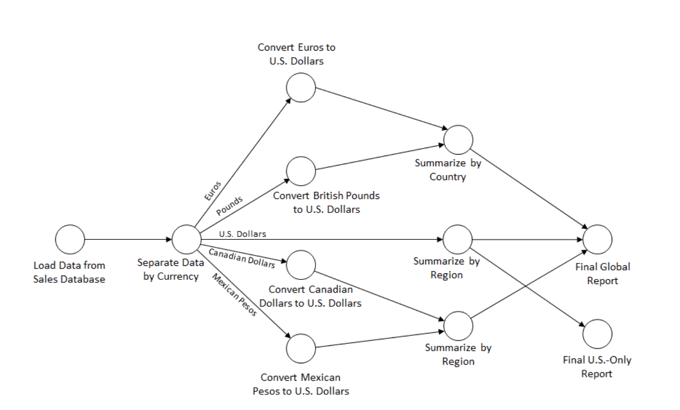
To understand the power of the new Workflows, we must first look at the limitations of the previous QueryPipeline architecture. While DAGs are excellent for straightforward tasks, they struggle with loops. For instance, if an agent generates a SQL query that fails syntax validation, a DAG cannot easily “go back” to the generation step to fix it. Event-driven architectures solve this by decoupling the steps.
Core Concepts: Steps, Events, and Context
In this new architecture, logic is encapsulated in steps. A step waits for a specific Event, processes data, and emits a new Event. This allows for:
- Cyclic Execution: A validation step can emit an event that triggers the generation step again if errors are found.
- State Management: A global
Contextobject persists data across steps, similar to how React or Redux manages state in frontend development. - Asynchronous Execution: Steps can run in parallel, leveraging Python’s
asynciocapabilities.
Let’s look at a basic Python structure for a Workflow. This example sets up a simple flow that takes a user query and decides whether to route it to a search engine or a database.
from llama_index.core.workflow import (
    StartEvent,
    StopEvent,
    Workflow,
    step,
    Event,
    Context
)
from llama_index.core import Settings

# Define custom events to carry data between steps
class QueryAnalyzedEvent(Event):
    query_type: str
    original_query: str

class SQLQueryGeneratedEvent(Event):
    sql_query: str

class WorkflowAgent(Workflow):

    @step
    async def analyze_query(self, ev: StartEvent) -> QueryAnalyzedEvent:
        print(f"Analyzing query: {ev.query}")
        # Logic to determine if this is a structured data request
        # In a real app, an LLM call would classify this
        is_sql = "sales" in ev.query.lower()
        return QueryAnalyzedEvent(
            query_type="sql" if is_sql else "general",
            original_query=ev.query
        )

    @step
    async def route_request(self, ev: QueryAnalyzedEvent) -> SQLQueryGeneratedEvent | StopEvent:
        if ev.query_type == "sql":
            print("Routing to SQL Generator...")
            # Placeholder for SQL generation logic
            fake_sql = "SELECT * FROM sales_data;"
            return SQLQueryGeneratedEvent(sql_query=fake_sql)
        else:
            return StopEvent(result="Handling general knowledge query via Vector Store.")

    @step
    async def execute_sql(self, ev: SQLQueryGeneratedEvent) -> StopEvent:
        print(f"Executing SQL: {ev.sql_query}")
        # Here we would connect to the DB
        return StopEvent(result="SQL Execution Result Payload")

# Usage
async def main():
    agent = WorkflowAgent(timeout=60, verbose=True)
    result = await agent.run(query="Show me the latest sales figures")
    print(result)

# Note: This requires an async environment like asyncio.run(main())
This structure is highly extensible. Developers following LangChain updates will recognize the similarity to LangGraph, but LlamaIndex’s implementation focuses heavily on data-centric orchestration. The use of Type hints throughout the code ensures better compatibility with tools like MyPy updates and IDE autocompletion.
Section 2: The Data Layer – SQL Schema and Optimization
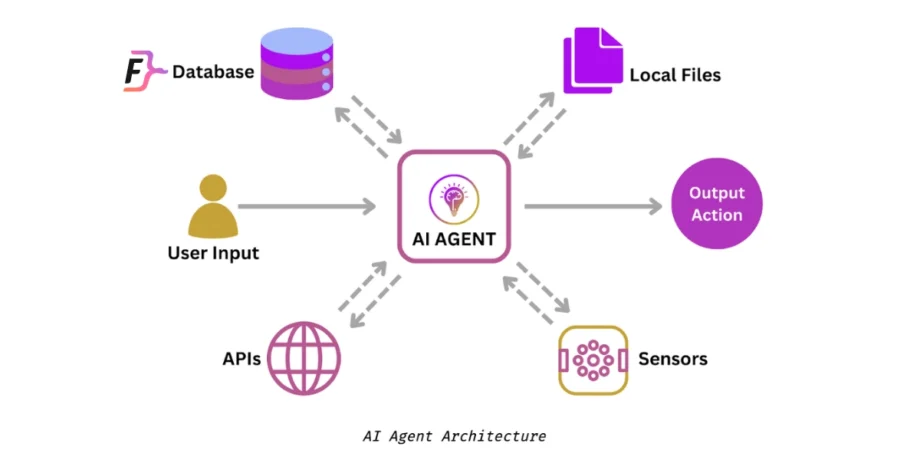
An AI agent is only as good as the data it can access. While vector databases handle unstructured text, the vast majority of business intelligence lives in SQL databases. When building a Text-to-SQL agent using LlamaIndex, you must ensure the underlying database is optimized for the queries the LLM might generate.
Poorly optimized databases can lead to timeouts, especially when an LLM generates complex joins. Furthermore, without proper constraints, an agent might hallucinate non-existent columns. Let’s define a robust SQL schema for a financial context, demonstrating best practices for indexing and data integrity.
Designing the Schema for AI Consumption
When an LLM inspects your schema (often via RAG), clear naming conventions and constraints help it understand relationships. Here is a PostgreSQL-compatible schema setup.
-- SCHEMA SETUP
-- Using clear table names helps the LLM understand the context

CREATE TABLE products (
    product_id SERIAL PRIMARY KEY,
    product_name VARCHAR(255) NOT NULL,
    category VARCHAR(100),
    unit_price DECIMAL(10, 2) NOT NULL,
    created_at TIMESTAMP DEFAULT CURRENT_TIMESTAMP
);

CREATE TABLE sales_transactions (
    transaction_id SERIAL PRIMARY KEY,
    product_id INT REFERENCES products(product_id),
    quantity INT NOT NULL CHECK (quantity > 0),
    total_amount DECIMAL(12, 2) NOT NULL,
    transaction_date TIMESTAMP DEFAULT CURRENT_TIMESTAMP,
    region VARCHAR(50)
);

-- INDEX CREATION
-- Critical for performance when the AI agent filters by date or region
-- This reduces the search space, preventing full table scans.

CREATE INDEX idx_sales_date ON sales_transactions(transaction_date);
CREATE INDEX idx_sales_region ON sales_transactions(region);
CREATE INDEX idx_product_category ON products(category);

-- COMPOSITE INDEX
-- Useful for queries like "Sales in North Region during 2023"
CREATE INDEX idx_region_date ON sales_transactions(region, transaction_date);
Handling Transactions and Safety
One of the biggest risks in Python automation involving SQL is accidental data modification. If your agent has write access, it must use transactions to ensure atomicity. Even for read-only agents, understanding isolation levels is key to reporting consistent data.
Below is an example of a transaction block an agent might need to construct or wrap its logic around to ensure that a multi-step update (e.g., inventory deduction) either fully succeeds or fully fails.
-- TRANSACTION EXAMPLE
-- Ensuring data integrity during an inventory update

BEGIN;

-- Step 1: Deduct item from inventory
UPDATE product_inventory
SET stock_level = stock_level - 5
WHERE product_id = 101 AND stock_level >= 5;

-- Step 2: Record the sale
INSERT INTO sales_transactions (product_id, quantity, total_amount, region)
VALUES (101, 5, 299.95, 'US-East');

-- Check for errors. If the update affected 0 rows (insufficient stock),
-- the application logic should issue a ROLLBACK.
-- Otherwise:
COMMIT;
Incorporating these SQL principles into your LlamaIndex application ensures that when your workflow executes a step named execute_sql_query, the underlying database performs efficiently and safely.
Section 3: Implementing the Text-to-SQL Workflow
Now, let’s combine the Event-Driven architecture with our SQL knowledge. We will build a workflow that acts as a “SQL Analyst.” This workflow will have a self-correction loop. If the database returns an error (e.g., “Column not found”), the workflow will catch this event, feed the error back to the LLM, and retry the generation. This is a massive improvement over linear chains.
This implementation leverages LlamaIndex news features regarding observability and the ability to carry context (like database schema info) through the Context object.
from llama_index.core.workflow import Workflow, step, StartEvent, StopEvent, Event
from llama_index.llms.openai import OpenAI
from llama_index.core.tools import FunctionTool
import sqlalchemy

# Define Events
class GenerateSQL(Event):
    query: str
    error_msg: str | None = None

class ExecuteSQL(Event):
    sql: str

class SummarizeData(Event):
    data: str
    original_query: str

class SQLWorkflow(Workflow):
    def __init__(self, db_engine, llm, *args, **kwargs):
        super().__init__(*args, **kwargs)
        self.engine = db_engine
        self.llm = llm
        self.max_retries = 3
        self.retry_count = 0

    @step
    async def generate_sql(self, ev: StartEvent | GenerateSQL) -> ExecuteSQL | StopEvent:
        # Determine input based on event type
        if isinstance(ev, StartEvent):
            user_query = ev.query
            error_context = ""
        else:
            user_query = ev.query
            error_context = f"\nPREVIOUS ERROR: {ev.error_msg}\nPlease fix the SQL."
            self.retry_count += 1
            if self.retry_count > self.max_retries:
                return StopEvent(result="Error: Max retries exceeded for SQL generation.")

        prompt = f"""
        You are a SQL expert. Write a PostgreSQL query for: "{user_query}".
        Schema: table 'sales_transactions' has columns (id, amount, date, region).
        Return ONLY the raw SQL string.
        {error_context}
        """

        response = await self.llm.acomplete(prompt)
        sql_query = response.text.strip().replace("```sql", "").replace("```", "")
        return ExecuteSQL(sql=sql_query)

    @step
    async def run_query(self, ev: ExecuteSQL) -> SummarizeData | GenerateSQL:
        print(f"Attempting to run: {ev.sql}")
        try:
            # Using SQLAlchemy for safe execution
            with self.engine.connect() as connection:
                result = connection.execute(sqlalchemy.text(ev.sql))
                rows = result.fetchall()
                data_str = str(rows)
                return SummarizeData(data=data_str, original_query="Get Sales") # Simplified
        except Exception as e:
            print(f"SQL Execution Failed: {e}")
            # LOOP BACK: Emit GenerateSQL event to retry with error context
            return GenerateSQL(query="Retry Query", error_msg=str(e))

    @step
    async def summarize(self, ev: SummarizeData) -> StopEvent:
        prompt = f"Data retrieved: {ev.data}. Summarize this for the user."
        response = await self.llm.acomplete(prompt)
        return StopEvent(result=response.text)

# Note: Integration with tools like 'DuckDB python' or 'Polars dataframe'
# can happen inside the run_query step for faster data processing.
This code demonstrates the power of the event loop. The run_query step can emit a GenerateSQL event, effectively creating a feedback loop that persists until the query is correct or retries are exhausted. This pattern is essential for Python security and reliability, preventing the application from crashing due to hallucinated SQL syntax.
Section 4: Best Practices, Optimization, and the Ecosystem
As we move towards productionizing these workflows, several advanced considerations come into play. The Python ecosystem is evolving to support these heavy workloads, and being aware of tools like Uv installer, Rye manager, or Hatch build can streamline your deployment pipelines.
Performance and Concurrency
With the upcoming GIL removal (Global Interpreter Lock) in Python 3.13+ (free threading), CPU-bound tasks within LlamaIndex workflows will see significant performance improvements. Until then, for heavy data processing (e.g., transforming SQL results into Polars dataframes), ensure you are offloading work efficiently.
If you are building a web interface for your agent using Reflex app, Flet ui, or PyScript web, ensure that your workflow execution is non-blocking. The async/await syntax used in the examples above is critical here. For backend APIs, integrating these workflows into Litestar framework or FastAPI allows for scalable microservices.
Testing and Quality Assurance
Testing non-deterministic AI agents is difficult. Standard unit tests aren’t enough. You should employ:
- Pytest plugins: Use
pytest-asyncioto test your workflow steps individually. - Static Analysis: Tools like Ruff linter and SonarLint python help catch logical errors in your workflow definitions.
- Type Safety: Heavy use of Type hints and MyPy updates ensures that the events passed between steps match the expected schema.
Security Considerations
When allowing an LLM to generate SQL, Malware analysis and injection prevention are paramount. Never allow the LLM to execute DDL statements (DROP, ALTER) unless strictly scoped. Always use a read-only database user for the engine connection in your workflow unless write access is explicitly required. Furthermore, consider using Pypi safety checks in your CI/CD pipeline to ensure your dependencies (like LlamaIndex and SQLAlchemy) are free from known vulnerabilities.
Conclusion
The transition from DAG-based query pipelines to event-driven Workflows represents a significant maturity milestone in LlamaIndex news. It acknowledges that true AI agents require the flexibility to loop, retry, and reason dynamically. By combining this architectural shift with robust SQL practices—proper indexing, schema design, and transaction management—developers can build powerful tools that bridge the gap between unstructured reasoning and structured enterprise data.
As the Python ecosystem continues to evolve with Rust Python integrations (like Pydantic) and the potential of the Mojo language for high-performance AI, the capabilities of these agents will only grow. Whether you are automating financial reporting, building Algo trading bots, or creating complex customer service agents, mastering LlamaIndex Workflows is now a critical skill for the modern AI engineer. Start experimenting with the beta today, and remember: the best agents are those that can gracefully recover from their own mistakes.