FastAPI on the Edge: Running Local LLMs on a Pi
I’m officially sick of renting $3/hour cloud GPUs just to parse text.
For the last few weeks, I’ve been moving my background summarization tasks off the cloud and onto hardware I actually own. The goal was simple enough. I wanted a local API that could ingest RSS feeds, summarize the articles, and dump them into a Postgres database. No external API calls to OpenAI. No massive AWS bills.
Just FastAPI, a local LLM, and a Raspberry Pi.
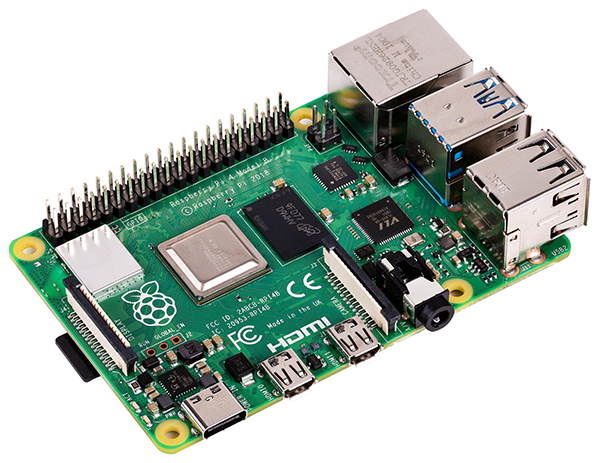
Everyone assumes you need a massive rig to run AI-driven endpoints right now. But actually, pushing a lightweight model onto edge hardware is entirely viable if you accept the constraints. I grabbed a Raspberry Pi 5 (the 8GB model) running Ubuntu 24.04, installed Ollama, and pulled Qwen 2.5 (the 1.5B parameter version). It’s tiny, but for basic text extraction and summarization, it punches way above its weight class.
Wiring it up with FastAPI is where things got messy. I built the routing layer with FastAPI 0.110.0 and Python 3.12.2. The idea is to have FastAPI act as the asynchronous traffic cop, receiving the webhook payloads from my scrapers and handing the text off to the local Ollama service.
But deploy this exact code to a Pi, hit it with three concurrent requests, and watch the whole thing collapse. I wasted an entire Sunday afternoon fighting the Linux OOM (Out of Memory) reaper. I kept getting Error: ENOMEM in my system logs, followed by the FastAPI process silently dying.

My fix was brutally simple. I dropped Uvicorn down to a single worker. I then threw Redis onto the Pi and set up a queue. FastAPI now does absolutely nothing but accept the POST request, dump the payload into Redis, and immediately return a 202 Accepted. A separate background worker pulls from Redis and feeds Ollama exactly one prompt at a time.
Latency? Terrible. It takes about 6.2 seconds to generate a two-sentence summary on the Pi. But for an asynchronous news aggregator, I don’t care if it takes six seconds or sixty. It never crashes anymore.
I should also mention how awful it is to debug this stuff directly on the device. Trying to run heavy language servers in VS Code over a standard SSH connection while the Pi’s CPU is pegged at 100% by an LLM is a miserable experience. I stopped using standard SSH for this last month. I’ve switched entirely to using MCP (Model Context Protocol) tools to handle the remote execution environment.
Look, the cloud is great when you need to serve thousands of users a second. But if you just need a localized agent to process background data, a $80 board running a quantized model is more than enough. You just have to respect the hardware limits. Queue everything, limit your workers, and let the little board take its time.
from fastapi import FastAPI, HTTPException, BackgroundTasks
import httpx
import json

app = FastAPI()

OLLAMA_URL = "http://localhost:11434/api/generate"
MODEL_NAME = "qwen2.5:1.5b"

async def generate_summary(text: str) -> str:
    prompt = f"Summarize this news article in two sentences:\n\n{text}"

    async with httpx.AsyncClient(timeout=45.0) as client:
        try:
            response = await client.post(
                OLLAMA_URL,
                json={
                    "model": MODEL_NAME,
                    "prompt": prompt,
                    "stream": False
                }
            )
            response.raise_for_status()
            return response.json().get("response", "")
        except httpx.ReadTimeout:
            print("Ollama timed out.")
            return "Summary generation failed."

@app.post("/ingest")
async def ingest_article(payload: dict):
    if "content" not  in payload:
        raise HTTPException(status_code=400, detail="Missing content")

    # In a real app, this goes to a background task
    # We are awaiting it here to test the latency
    summary = await generate_summary(payload["content"])

    return {"status": "processed", "summary": summary}
Common questions
Can a Raspberry Pi 5 actually run a local LLM with FastAPI for summarization?
Yes, a Raspberry Pi 5 with 8GB of RAM running Ubuntu 24.04 can handle a local LLM for text summarization. The setup uses Ollama with Qwen 2.5 (1.5B parameter version), which is lightweight enough for edge hardware. FastAPI 0.110.0 on Python 3.12.2 acts as the routing layer, accepting webhook payloads from scrapers and passing text to the local Ollama service for processing.
Why does FastAPI crash with ENOMEM errors on Raspberry Pi under concurrent requests?
Hitting the Pi with three concurrent requests triggers the Linux OOM (Out of Memory) reaper, which kills the FastAPI process silently and logs Error: ENOMEM. The 8GB Pi simply cannot hold multiple LLM inference sessions in memory simultaneously. The fix is to drop Uvicorn to a single worker and queue all incoming requests through Redis so Ollama only processes one prompt at a time.
How slow is local LLM summarization on a Raspberry Pi 5 compared to cloud APIs?
Generating a two-sentence summary on the Raspberry Pi 5 takes about 6.2 seconds using Qwen 2.5 1.5B through Ollama. That latency is terrible compared to cloud GPUs, but acceptable for asynchronous workloads like news aggregation where six or even sixty seconds does not matter. The tradeoff is avoiding $3/hour cloud GPU rentals and OpenAI API bills for background summarization tasks.
How do you handle concurrent requests to a local Ollama instance without crashing?
Use Redis as a queue in front of FastAPI. The FastAPI endpoint accepts the POST request, dumps the payload into Redis, and immediately returns a 202 Accepted response without calling the LLM directly. A separate background worker pulls jobs from Redis and feeds Ollama exactly one prompt at a time, preventing the Out of Memory reaper from killing the process under load.