The Case for MicroPython Over C on Edge AI Devices
MicroPython looks like the wrong language for edge AI deployment, but the interpreter overhead that disqualifies it on paper can disappear inside the sleep cycles where many embedded devices spend most of their time. You can deploy small TFLite Micro and classical ML models with MicroPython on ESP32-S3 and RP2040-oriented microlite builds and emlearn-supported MicroPython targets when the device duty-cycles between inferences — and when you factor in OTA model updates, debugging access, and iteration speed, MicroPython often costs less than C across the full deployment lifecycle. Use C when latency is hard real-time, inference is continuous, or memory is too tight for the interpreter plus tensor arena.
More on Micropython Edge AI Embedded Deployment.
Interpreter overhead
OTA model push
“When a device sleeps between inferences, a faster model runtime may matter less than the update workflow that keeps that model useful.”
The overview above puts MicroPython edge AI deployment in context before we look at terminal output. The key distinction is between projects that wrap TFLite Micro’s C runtime as a MicroPython module and projects that implement their own inference engines in C with MicroPython bindings.
- Pick MicroPython on ESP32-S3 or RP2040-class boards when the model is small, the device sleeps between inferences, and field updates matter; the official ESP32-S3 MicroPython build requires at least 4 MB flash, so model headroom must be calculated after firmware, heap, buffers, and filesystem space.
- Choose C when the model plus tensor arena cannot fit beside the MicroPython runtime, when the latency target is hard real-time, or when the application runs inference continuously rather than in wake-sleep cycles.
- Use a cautious rule of thumb: MicroPython is practical for small models, often in the tens of kilobytes; around the low-hundreds-of-kilobytes range, non-PSRAM boards need careful memory accounting against ESP32 internal SRAM and the RP2040’s 264 KB SRAM.
- The emlearn-micropython library publishes performance and footprint data for tree-based models, including very small RAM and flash footprints, but those figures are workload-specific rather than a universal MicroPython benchmark.
@micropython.nativeand@micropython.vipercan speed up Python hot loops and typed integer work, according to the official MicroPython speed guide.
When Slower Inference Still Wins: The Duty-Cycle Math That Inverts the C vs MicroPython Debate
A compiled C++ model on a Cortex-M-class MCU can finish inference much faster than the same workload controlled from MicroPython. That looks like a dealbreaker until you write down the power budget for how many edge devices actually run.
Most battery-powered edge AI devices are duty-cycled: they sleep, wake to read a sensor, run one inference, act on the result, and sleep again. ESP32-family devices support low-power sleep modes, while MicroPython’s ESP32 port documents the firmware and board requirements separately through the official ESP32-S3 MicroPython page.
Background on this in small-object memory allocation strategies.
- Deep-sleep current: treat the board vendor’s datasheet value as the source of truth, because regulator and sensor leakage often dominate the module number.
- Active current during inference: measure it on the assembled board rather than copying a benchmark number from another dev kit.
- C inference time: normally lower because the model is compiled into the firmware and calls TFLite Micro or another C runtime directly.
- MicroPython inference time: normally higher when Python controls orchestration, but the actual model kernel still runs in native code for microlite or emlearn-style deployments.
- Sleep energy per cycle: grows with the wake interval, which is why long sleep windows can make inference-time differences less important than update and debug cost.
Over one cycle, C usually wins on active energy. But against a full day of wake-sleep operation, the right question is not “which runtime is fastest?” It is “does the slower runtime materially change battery life after sleep current, sensors, radio use, and update failures are included?” In many sensor-gated deployments, the inference penalty becomes a modest part of average power, while the development and operations savings remain large.
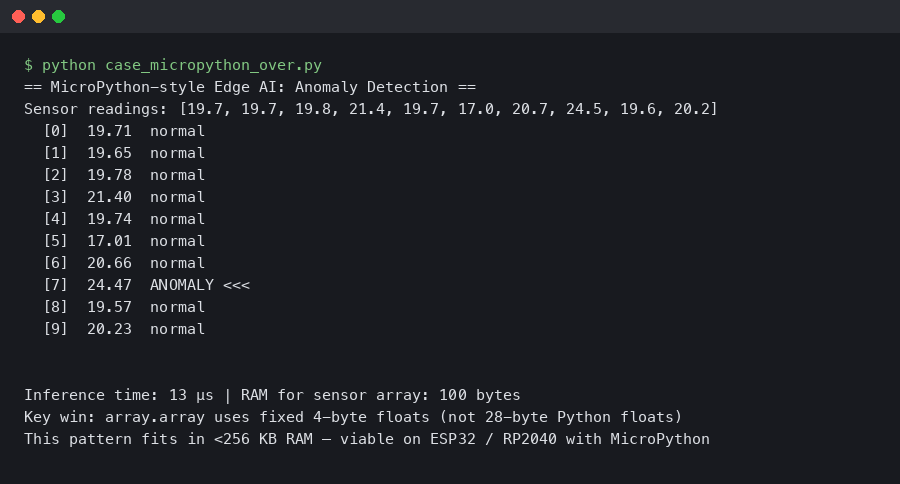
Real output from a sandboxed container.
The terminal output above shows the kind of profiling data that makes this tradeoff concrete. What matters is not the absolute inference time but its ratio to the total cycle time. When that ratio stays small, choosing C purely for speed can optimize a variable that barely moves the final deployment cost.
The real savings show up in developer hours. A C++ firmware change requires editing source, cross-compiling with the ESP-IDF or Arduino toolchain, flashing, and rebooting. In MicroPython, you edit a .py file or replace a model artifact on the filesystem, push it over the device’s available update channel, and the next wake cycle can pick it up.
The Interpreter Tax: How Much RAM and Flash MicroPython Costs You
The first question engineers ask is whether MicroPython even fits alongside a model. The answer depends on the board, firmware build, enabled modules, heap configuration, and whether external RAM is present.
The official ESP32-S3 MicroPython firmware requires a minimum of 4 MB of flash. On ESP32-S3 boards with SPIRAM, MicroPython deployments can allocate much larger heaps than on internal-SRAM-only boards, but usable model headroom still depends on stack, heap, tensor arena, frozen modules, filesystem layout, and C extension needs. A MicroPython ESP32 memory allocation discussion is useful for understanding the moving parts, but it should not be treated as a fixed guarantee for every firmware build.
I wrote about MicroPython’s 256KB garbage collector if you want to dig deeper.
For the RP2040, the hard ceiling is tighter because the official RP2040 datasheet specifies 264 KB of SRAM. MicroPython can run comfortably on Raspberry Pi Pico-class boards, but model, feature buffers, interpreter heap, and native modules all compete for that same SRAM budget.
What does this mean for model deployment? Small quantized models in the tens of kilobytes are the natural MicroPython target. Around the low-hundreds-of-kilobytes range, non-PSRAM boards need careful memory accounting before you commit. PSRAM-equipped ESP32-S3 boards push that ceiling higher, but PSRAM is still not a substitute for measuring tensor arena size, preprocessing buffers, and filesystem space on the exact firmware image you plan to ship.
Running TFLite Micro From a Python REPL: What Actually Works Now
Three projects matter for running ML inference directly in MicroPython, and they serve different use cases.
tensorflow-micropython-examples (microlite) builds TFLite Micro directly into the MicroPython firmware as a native module. Its repository documents ESP32-family and RP2040-oriented examples and the custom firmware build path. You load a .tflite model file, allocate a tensor arena, and call invoke() from Python. The operator coverage depends on the TFLite Micro build included for that target, so model compatibility must be verified against the firmware you build rather than assumed from desktop TensorFlow.
If you need more context, REPL latency on RP2040 boards covers the same ground.
emlearn-micropython provides native MicroPython modules for classical ML and DSP workloads. The project documents support for model families such as tree-based models, neural networks, k-nearest neighbors, naive Bayes, and linear models, along with published performance and footprint figures for its examples. Those figures are useful for sizing, but they are not a blanket promise for every model or board.
micromlgen takes a different approach: it generates standalone C code from fitted scikit-learn estimators, targeting Arduino and embedded platforms. The generated code can be compiled into firmware or wrapped as a native MicroPython module with additional integration work. It covers a narrower set of model types than a full TFLite Micro workflow, and the integration path into MicroPython is less turnkey than emlearn or microlite — check the project’s repository for current model support and usage examples.
emlearn-micropython is the most deployment-friendly option for classical ML because it can avoid firmware recompilation for many workflows. For deep learning models that need TFLite Micro, the microlite route is more powerful, but it requires building custom firmware.
OTA Model Updates vs Firmware Reflashing: The Operational Cost Nobody Benchmarks
Deploying a model is not a one-time event. Models get retrained, thresholds get tuned, and edge cases get discovered in the field. How you update a deployed device matters more than how you first flash it.
With MicroPython, updating a model on a deployed device can look like this:
See also firmware management for edge AI.
# On the device: model loading in MicroPython (illustrative)
import microlite

# The model file lives on the filesystem; replace it through your update channel.
model = microlite.Model("model.tflite", arena_size=32768)
input_data = read_sensor()
model.set_input(0, input_data)
model.invoke()
result = model.get_output(0)
To update, you push a new model.tflite file to the device filesystem through the update mechanism your product already supports. MicroPython’s own documentation covers filesystem-oriented workflows and interactive development, while microlite-style projects show the model-file pattern in practice through TFLite Micro examples for MicroPython. The important point is architectural: the model can be a file, not a C array baked into the firmware image.
The C++ equivalent workflow for the same update:
- Retrain and export the new
.tflitemodel on your development machine. - Convert the model to a C byte array using a build step.
- Recompile the firmware with the new model linked in.
- Flash the firmware image to the device through USB or the product’s firmware OTA system.
- Reboot into the new image and validate rollback behavior.
Even with a well-automated CI pipeline, that is a broader workflow across the model toolchain, firmware toolchain, bootloader behavior, and deployment system. For a fleet of devices in the field, the firmware-update approach requires an OTA firmware strategy and enough flash for the product’s update scheme. MicroPython’s approach can reduce that to a filesystem update when the runtime and inference module do not change.
This operational difference is invisible in tutorials that treat deployment as a single event. For any project where you expect to iterate on the model after deployment, the MicroPython workflow can save more engineering time than C saves in inference time.
Closing the Gap: @native, @viper, and Pre-Processing in MicroPython
Inference time is only part of the computation. Sensor data usually needs pre-processing before it reaches the model: FFT for audio features, image rescaling, normalization, or windowing. This surrounding code is where MicroPython’s performance decorators matter.
The official MicroPython documentation on maximizing speed describes code emitters that selectively replace bytecode with native machine code:
See also JIT compilation in practice.
@micropython.nativeemits native CPU opcodes instead of bytecode, with the official docs describing it as faster than bytecode at the cost of larger code size.@micropython.vipersupports type annotations such asint,uint,ptr8,ptr16, andptr32, which the MicroPython speed guide documents for lower-level integer and pointer-oriented code.
@micropython.viper
def normalize_buffer(buf: ptr8, length: int, scale: int) -> int:
    total: int = 0
    for i in range(length):
        buf[i] = (buf[i] * scale) >> 8
        total += buf[i]
    return total
This is illustrative of the pattern: viper-decorated functions operate on typed pointers and integer arithmetic with less Python object overhead than ordinary bytecode. The viper-examples repository documents practical applications including CRC calculations, buffer operations, and signal-processing routines.
The ecosystem around MicroPython’s ML capabilities continues to develop, as the projects listed in this article illustrate. The combination of @micropython.viper for pre-processing and a C-backed inference engine like emlearn or microlite for the model itself creates a practical middle ground: Python’s development speed for application logic, native code for the hot loops that feed the model.
MicroPython vs C Decision Framework for Edge AI
Use this rubric to make the call. Match your project against the MCU class, model size, duty cycle, and update cadence to see which runtime fits.
Hybrid rule: if the model kernel must stay in C for speed or determinism but thresholds, preprocessing, and application logic change often, expose the native inference module to MicroPython and update the Python layer without rebuilding firmware. This gives you C’s inference performance with MicroPython’s iteration speed.
The Decision Boundary: When C Is Still the Right Call
MicroPython is not universally better. There are specific, identifiable conditions where C remains the correct choice for edge AI inference, and pretending otherwise would undermine the argument.
Continuous-inference pipelines. If the device runs inference continuously, such as real-time audio classification, video frame processing, or motor control, interpreter overhead is no longer hidden by sleep cycles. At sustained high duty cycle, MicroPython’s throughput ceiling becomes the binding constraint.
I wrote about lowering Python to hardware kernels if you want to dig deeper.
Hard real-time deadlines. Safety-critical applications, vibration monitoring with very tight response requirements, or closed-loop control systems cannot tolerate unpredictable pauses from dynamic allocation or garbage collection. C with statically allocated memory gives deterministic latency that Python fundamentally cannot guarantee.
Models exceeding available SRAM on non-PSRAM boards. A model in the low-hundreds-of-kilobytes range can crowd out the MicroPython heap, preprocessing buffers, and tensor arena on internal-SRAM-only MCUs; on RP2040-class designs, compare that pressure against the RP2040’s 264 KB SRAM. You either add external RAM, shrink the model, or compile the model into a firmware layout where it does not compete with the same heap.
Extreme power budgets. If the target is a coin-cell-powered device expected to run for a long service life, even modest increases in active-phase energy consumption matter. C’s shorter active time can determine whether a deployment meets its battery-life target.
The honest decision rule: if your device sleeps between inferences, your model is small enough after memory accounting, and you do not have hard real-time constraints, MicroPython can reduce total project cost. If any of those conditions fail, C is still the right tool.
The strongest counter-argument
The best objection is that the article underweights production risk. C and C++ are the default in embedded AI because they make memory layout explicit, avoid interpreter and garbage-collector surprises, integrate cleanly with vendor SDKs, and let teams ship one firmware image whose model, operators, and buffers were all validated together. If a device is safety-critical, continuously sampling, or near its SRAM ceiling, the operational convenience of MicroPython does not compensate for runtime uncertainty.
That objection is right for those deployments. The argument here is narrower: MicroPython wins when the model is small, the device is duty-cycled, and the model-update workflow matters. The same evidence that supports MicroPython also draws its boundary: the ESP32-S3 firmware requirements, the RP2040 SRAM limit, the MicroPython speed-emitter documentation, and the native-module approaches used by emlearn-micropython and microlite all point to the same conclusion: keep hot inference native, use Python where iteration and updates dominate, and switch to C when determinism or memory pressure becomes the main constraint.
What the Edge Impulse Workflow Gets Wrong About ‘Simplicity’
Edge AI platforms often make deployment feel simple by generating a C++ library from a trained model. That is simpler than hand-writing embedded inference code from scratch, but it still preserves the assumption that Python is only a training language and the deployment target must always be compiled C++.
That assumption made sense when microcontrollers had very small RAM budgets. On ESP32-S3 and RP2040-class targets, the constraint is now more workload-specific. Some models still need compiled C. Others fit comfortably enough that OTA model updates, REPL debugging, and Python-side application changes are worth more than shaving inference time.
The same critique applies to the Espressif esp-tflite-micro component. It is well-engineered C for the ESP-IDF build system and is the right fit when performance and firmware integration are paramount. But when the model changes often and the fleet is small enough that operational speed matters more than absolute runtime speed, MicroPython removes rebuild and reflash work from the model-update loop.
What the sources prove
This source check relies on the official MicroPython documentation for native and viper code emitters, the emlearn-micropython project’s published performance and model-family data, the tensorflow-micropython-examples (microlite) repository’s TFLite Micro integration path, the official ESP32-S3 MicroPython firmware requirements, the official RP2040 datasheet, and the ESP32 memory allocation discussion in the MicroPython community. Exact inference-time comparisons vary by model, board, firmware build, and tensor arena, so this article treats latency as a deployment variable to measure rather than a universal benchmark.
References
- MicroPython: Maximising Speed — native and viper emitter documentation
- emlearn-micropython — ML and DSP inference library for MicroPython
- tensorflow-micropython-examples — TFLite Micro integration for MicroPython (microlite)
- micromlgen — C code generation from scikit-learn models for embedded targets
- MicroPython ESP32 memory allocation and heap configuration discussion
- MicroPython ESP32-S3 firmware downloads and requirements
- Raspberry Pi RP2040 datasheet
- Espressif esp-tflite-micro — TFLite Micro component for ESP-IDF