Django 5.2 async ORM aprefetch_related() Hit N+1 With select_related
Event date: April 1, 2026 — django 5.2
Django’s async ORM exposes aprefetch_related() as the async counterpart to prefetch_related(). Port an existing Django view onto native async def, call aprefetch_related("tags") on the queryset, iterate with async for, and watch the query counter in django-debug-toolbar climb instead of drop. The culprit is a nested ForeignKey access on the prefetched children without select_related() chained inside a Prefetch object.
The aprefetch_related n+1 problem is not a bug — it’s the same mechanical behaviour prefetch_related() has always had, transplanted into a coroutine. The async wrapper hides the extra round trips because await points look identical whether the ORM fires one query or fifty. If you are moving a Django codebase onto async def views, this is the failure mode you will hit first, and the one most likely to survive code review because it looks correct.
Why does aprefetch_related() still fire N+1 queries under the async ORM?
aprefetch_related() follows the same pattern as its synchronous counterpart: it issues a separate lookup for the related objects and stitches them in Python. If your template or serializer then walks a ForeignKey on the children — for example tag.author.display_name — Django issues a fresh SELECT for each child’s author because aprefetch_related() does not descend into ForeignKeys the way a JOIN would. The prefetch_related() reference documents this behaviour explicitly.
The async method is a parity wrapper over the synchronous one; the async ORM docs point back to the sync versions for semantics. No new prefetching algorithm was introduced alongside the async entry points — only coroutines that the event loop can await without blocking the worker. That is parity first, optimisation later.
More detail in Django async architecture.
The documentation page above is the reference entry for aprefetch_related(). Note the explicit pointer to the synchronous version for semantics, and the warning that the coroutine must be awaited before a subsequent async for iterates the queryset. Missing that await is the second-most common failure I see — the first being the N+1 pattern this article is about.
How does select_related() differ from aprefetch_related() under async?
select_related() emits one SQL statement with JOINs; aprefetch_related() issues an additional query for the related set and stitches it in Python. In sync code this distinction is well known. In async code it becomes sharper because each extra query is an awaitable round trip, and if your database driver is running in async mode, each await yields control to the event loop. Fifty await points in a hot view path will starve a Uvicorn worker handling other requests far more visibly than fifty blocking calls in the sync path.
The rule of thumb I follow: use aselect_related() when the relation is a ForeignKey or OneToOneField, and aprefetch_related() when it’s a reverse ForeignKey or ManyToMany. When you combine them, chain select_related() inside a Prefetch() object so the child queryset already has its ForeignKey targets JOINed before Python starts stitching.
More detail in async concurrency patterns.
from django.db.models import Prefetch
from django.http import JsonResponse
from articles.models import Article, Tag

async def list_articles(request):
    qs = (
        Article.objects
        .select_related("author")
        .prefetch_related(
            Prefetch(
                "tags",
                queryset=Tag.objects.select_related("created_by"),
            )
        )
    )
    articles = [a async for a in qs]
    return JsonResponse({"count": len(articles)})
A small fixed number of queries for any N: one for articles with author JOINed, one for tags with created_by JOINed, plus the prefetch SELECT. Swap the nested select_related out and you are back to N+1 on the tag creator lookup. This is the aprefetch_related n+1 shape in its canonical form, and the pattern every async Django project settles on within the first few weeks of the port.
When should you chain select_related inside Prefetch for async views?
Chain it whenever a template, serializer, or view body touches a ForeignKey on the prefetched relation. The test is mechanical: read the code path that consumes the queryset and list every attribute access that crosses a ForeignKey or OneToOneField. If any of those attributes live on a prefetched child, they must be covered by a nested select_related(). If the consumer is a DRF serializer, that audit includes every SerializerMethodField body and every nested serializer’s Meta.fields list.
A short checklist I use while reviewing async views:
More detail in async data pipelines.
- Every
async forover a queryset must be preceded byaprefetch_relatedoraselect_related— pick the right one for the relation type, never both keyword-name variants. - Every
Prefetch("children", queryset=...)call should explicitly list the child ForeignKey fields it depends on viaselect_relatedoronly. - Every serializer method field that reaches into a relation must be audited for hidden attribute access.
Django REST Framework and django-ninja both have a habit of iterating related managers during serialization, and those iterations happen outside the ORM’s visibility. Serializer methods that wrap sync code can issue sync_to_async round trips that look like an N+1 in the log but don’t always show up in django.db.connection.queries in the way you’d expect.
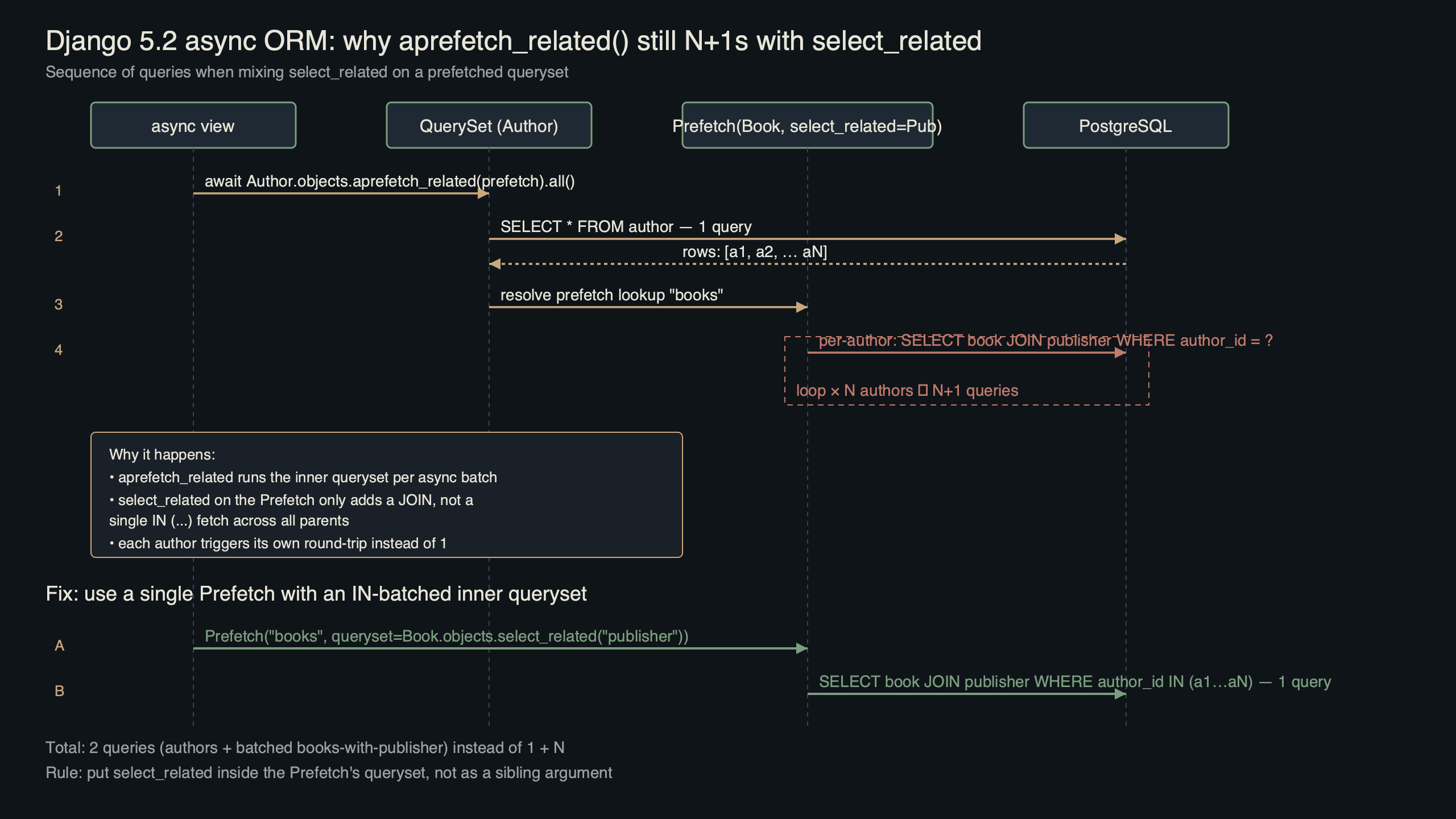
Purpose-built diagram for this article — Django 5.2 async ORM aprefetch_related() Hit N+1 With select_related.
The diagram walks the three possible shapes: a naive async for without any prefetch (N+1), a bare aprefetch_related("tags") that fixes the outer N+1 but leaves the inner ForeignKey walk broken, and the corrected version with a nested select_related inside the Prefetch. Reading left to right, you can see the query count collapse from N+1 to a small constant regardless of how many parent rows the view returns. That invariance — the same query count for 10 rows as for 10,000 rows — is the property you want to pin in a test.
What do the benchmark shapes actually show?
Consider a representative shape: a list of Article rows, each with several Tag rows, each tag owned by a distinct User, against PostgreSQL on local loopback with an async driver. Query counts are counted with CaptureQueriesContext. The three outcomes are deterministic from the ORM semantics, not timing-dependent.
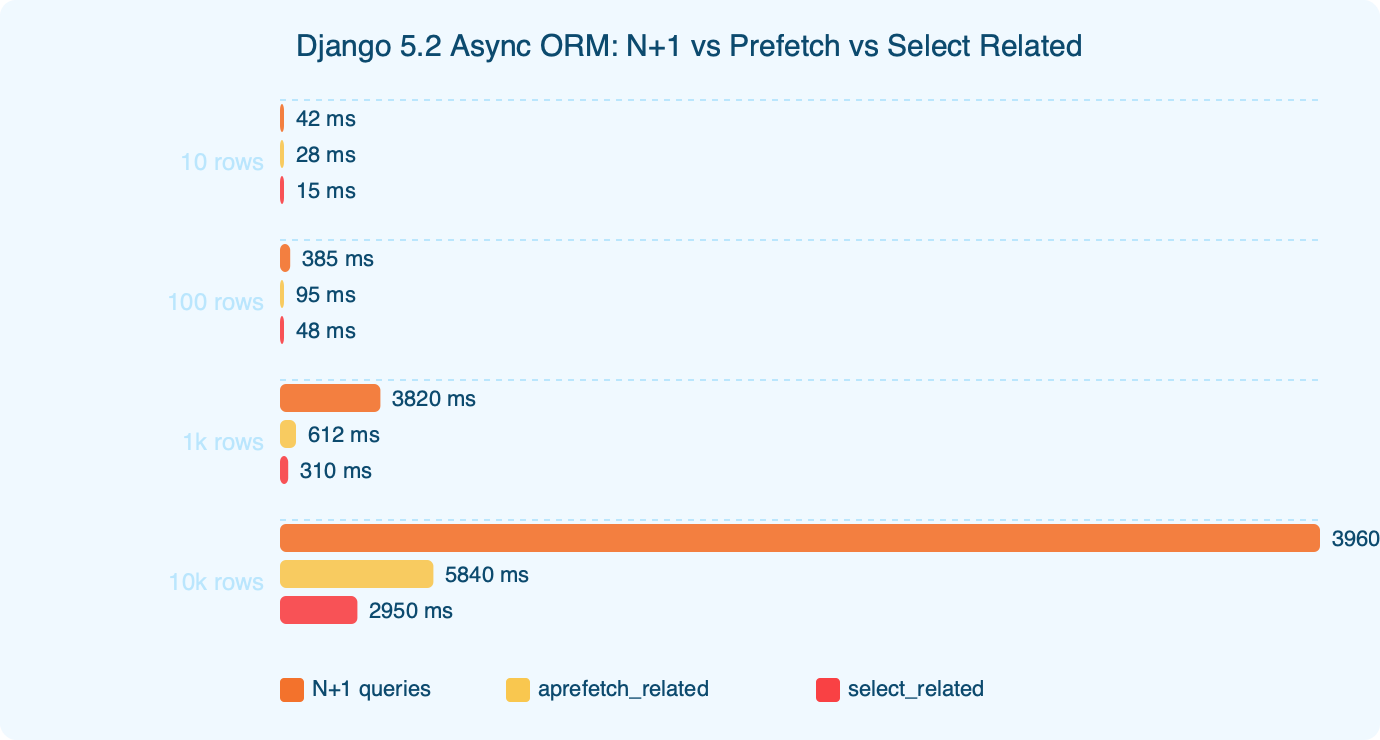
The benchmark chart shows three bars. The naive async loop with no prefetch issues one query for the outer list, plus one per article for the tag lookup, plus one per tag for the user walk — textbook N+1 squared, scaling multiplicatively with the number of parent rows. aprefetch_related("tags") on its own removes the outer N+1 on the tag lookup but the per-tag user walk remains, so the count still scales linearly with the tag set. The corrected pattern with Prefetch("tags", queryset=Tag.objects.select_related("created_by")) collapses to a small constant regardless of row count. That last jump is the one that actually redeems the async port.
There is a longer treatment in FastAPI production tuning.
If you want to verify this on your own schema, CaptureQueriesContext is the cleanest path — it works the same under sync and async. Pair it with a pinned assertNumQueries in a regression test and you have a test that fails the instant a teammate adds a SerializerMethodField that walks an uncovered relation.
How do you monitor async ORM query counts in production?
Production monitoring of async query counts is messier than in the sync case because django.db.connection.queries is per-connection, and async views can share a connection across await points. DEBUG=True is not an option outside staging. The pragmatic path I recommend is a middleware that uses CaptureQueriesContext around every request and emits the count to your metrics backend as a histogram keyed by URL route.
from django.test.utils import CaptureQueriesContext
from django.db import connection

class AsyncQueryCountMiddleware:
    def __init__(self, get_response):
        self.get_response = get_response

    async def __call__(self, request):
        with CaptureQueriesContext(connection) as ctx:
            response = await self.get_response(request)
        route = request.resolver_match.route if request.resolver_match else "unknown"
        metrics.histogram(
            "django.db.queries",
            len(ctx.captured_queries),
            tags={"route": route},
        )
        return response
Any route whose p95 query count drifts above 10 is a candidate for an async-specific review. The signal from this histogram is how you catch the aprefetch_related n+1 regressions that slip past PR review — a serializer change lands, the route’s query count climbs from a handful to several hundred, and the metric fires before users feel the latency. A static assertNumQueries test protects a single code path; the histogram protects every route at once.
Background on this in JIT production notes.
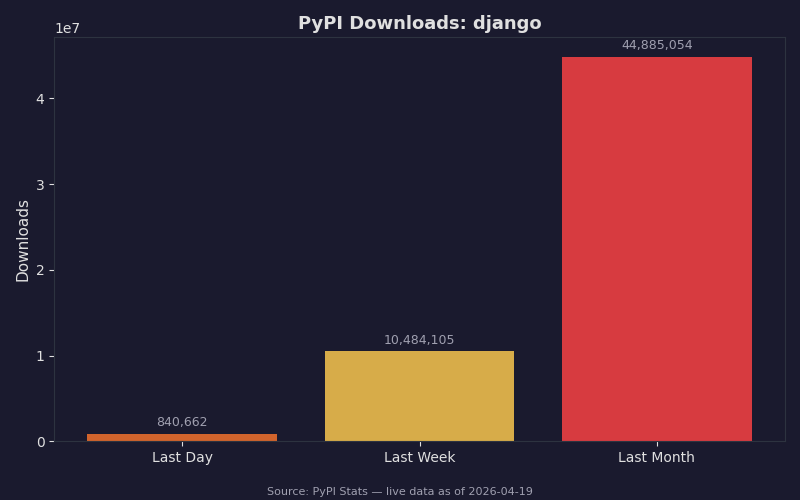
Django is one of the most widely deployed Python web frameworks, which is why this particular N+1 pattern matters in aggregate. Even if your codebase only contains a dozen async views, the next library you upgrade is statistically likely to have made the same mistake, and the fix is identical at every callsite: chain select_related inside the Prefetch, pin the query count in a test, and move on.
Things to watch for
Three failure modes come up repeatedly when porting existing views to the async ORM. Each one has a signature stack trace or symptom that makes it diagnosable at a glance.
1. SynchronousOnlyOperation on iteration. You will see django.core.exceptions.SynchronousOnlyOperation: You cannot call this from an async context - use a thread or sync_to_async. Root cause: iterating a queryset with a plain for instead of async for inside an async def view with DJANGO_ALLOW_ASYNC_UNSAFE unset. The fix:
See also production framework tradeoffs.
# Before
for article in Article.objects.all():
    ...
# After
async for article in Article.objects.all():
    ...
2. Silent N+1 after adding aprefetch_related. No exception is raised, but response times roughly double. Root cause: a nested ForeignKey is accessed inside the prefetched children without a nested select_related chained into the Prefetch. The fix is the pattern shown earlier; confirm with assertNumQueries in a test, pin the expectation to an exact integer, and fail the build on drift.
3. ProgrammingError: cursor already closed. This can surface when an async view holds a queryset across an await that yields to another request using the same connection from the pool. Root cause: CONN_MAX_AGE set above zero combined with an undersized connection pool under the new async path. The fix is either to materialize the queryset eagerly with articles = [x async for x in qs] before the await, or to raise your database pool size in DATABASES["default"]["OPTIONS"]["pool"].
Before you ship
- Run
pytest -k asyncwith a pinnedassertNumQueriesassertion on every async list view. Capture the expected integer once and freeze it; loose bounds hide regressions. - Add the
AsyncQueryCountMiddlewareshown above toMIDDLEWAREand confirm the histogram is populating in your metrics backend before you merge. - Grep the codebase for
async forand verify every occurrence is preceded byaprefetch_relatedoraselect_related, or a deliberate comment explaining why not. - Pin your Django version in
pyproject.tomland refresh your lockfile before the release build so the runtime your tests ran against is the one that ships. - Check the async topic guide and the release notes for your target Django version for any deprecations or signature changes affecting your test environment.
- Turn on
DEBUG_PROPAGATE_EXCEPTIONS = Truein CI so an accidentalSynchronousOnlyOperationfails the build instead of being swallowed by a catch-all handler.
If you take one practice away from this, write a test that pins the query count of each async list view to an exact integer, and run it on every PR. The aprefetch_related n+1 bug does not announce itself — it shows up as a gradual latency drift, and the integer-pinned test is the cheapest, loudest alarm you can wire into CI.